
Reverse proxy
Reverse proxy and Fortified ID products
Overview
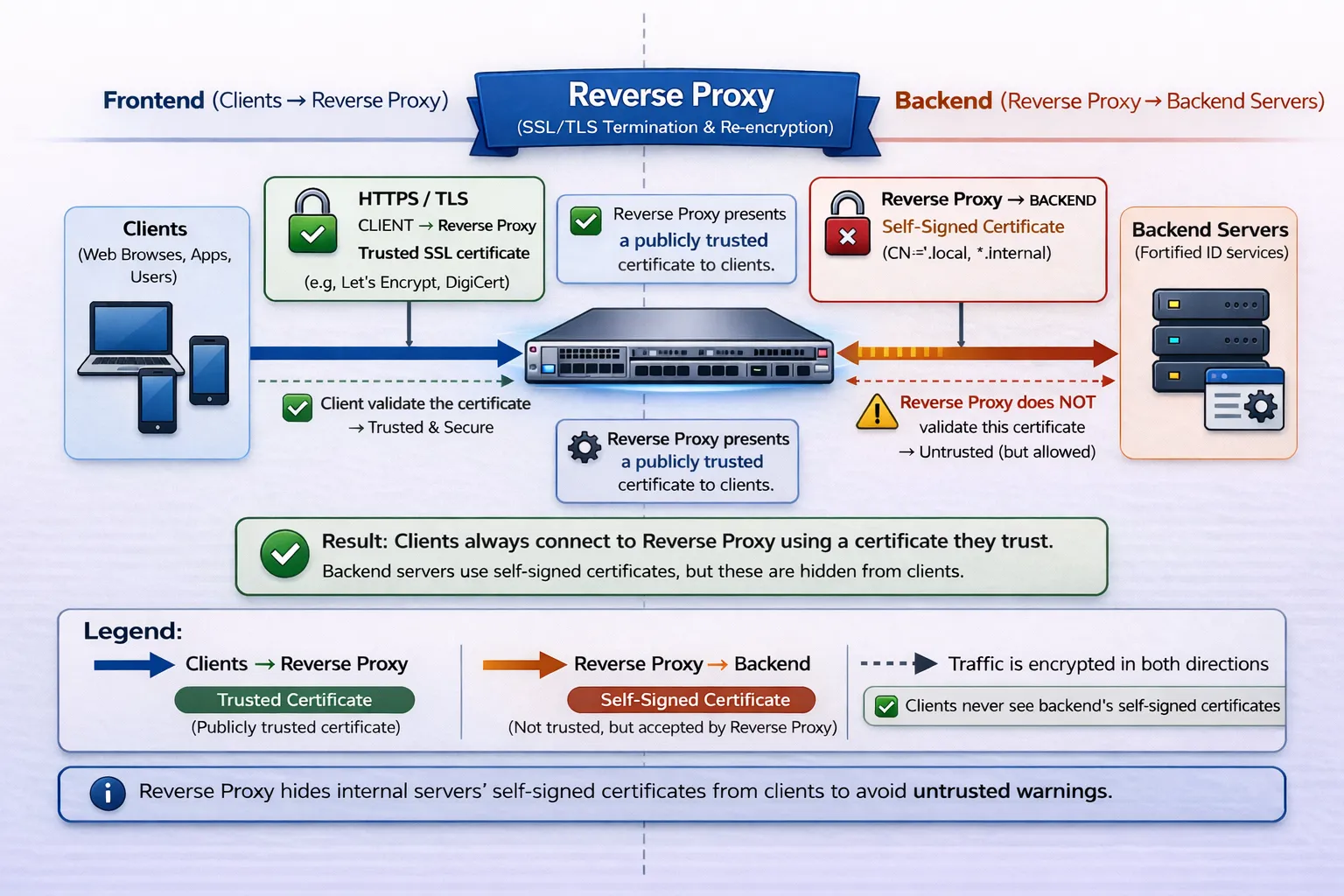
Section titled “Overview”Fortified ID does not have a reverse proxy product. We strongly recommend to use a reverse proxy in front of our products. The main reasons are:
1. Security
A reverse proxy hides internal servers from the internet and can block malicious traffic before it reaches the backend.
2. Load balancing
It distributes incoming requests across multiple backend servers to improve performance and reliability.
3. TLS termination
The reverse proxy handles HTTPS encryption, so backend servers can communicate internally over simpler HTTP.
Example of reverse proxy rules
Section titled “Example of reverse proxy rules”Depending on which reverse proxy product is used (see the section further down in this document), the interface for configuring the rules may differ slightly.
However, the information required to configure Fortified ID products generally follows the structure described below.
Communication
Section titled “Communication”-
The end user browses to
https://fqdn_external_name/portal/(using HTTPS on port 443).
-
The reverse proxy (RP) forwards the request to
https://backend_server_name:8445/portalThe reverse proxy uses a certificate to establish the HTTPS connection between the end user and the reverse proxy.
-
The backend server (running the Fortified ID Portal) receives the request at
https://backend_server_name:8445/portalThe backend server uses its own certificate for the HTTPS connection between the reverse proxy and the backend server.
Default ports for Fortified ID products
Section titled “Default ports for Fortified ID products”The following default endpoints are used by Fortified ID components:
fqdn_external_name - External DNS name that end-user browse to
backend_server_name - Internal DNS name to find Fortified ID service for the reverse proxy
https://fqdn_external_name/access -> https://backend_server_name:8443/access
https://fqdn_external_name/saml -> https://backend_server_name:8443/saml
https://fqdn_external_name/oidc -> https://backend_server_name:8443/oidc
https://fqdn_external_name/portal -> https://backend_server_name:8445/portal
https://fqdn_external_name/control -> https://backend_server_name:8450/control
https://fqdn_external_name/enrollment -> https://backend_server_name:8444/enrollment
https://fqdn_external_name/pwdreset -> https://backend_server_name:8446/pwdreset
https://fqdn_external_name/mgmt -> https://backend_server_name:4443/mgmt
Which reverse proxy should I choose?
Section titled “Which reverse proxy should I choose?”Overview
Section titled “Overview”The recommended approach is to use an existing reverse proxy already deployed in the customer’s environment.
If the customer does not have an existing reverse proxy solution, you may need to install and configure one as part of the deployment.
An important consideration is the ongoing industry shift toward short-lived TLS certificates (47-day validity). This change will be introduced gradually and is expected to be fully adopted by 2029. The intent is that certificate issuance and renewal will be fully automated.
When selecting a reverse proxy solution, you should therefore ensure that automatic certificate management can be implemented together with the customer.
Best practice when choosing reverse proxy
Section titled “Best practice when choosing reverse proxy”Use an Existing Reverse Proxy
Section titled “Use an Existing Reverse Proxy”Whenever possible, use a reverse proxy that is already deployed and managed by the customer.
Common examples include:
- F5
- Citrix NetScaler
- SiteMinder
- Azure Application Gateway
These solutions often already include certificate lifecycle management, which may simplify handling the upcoming 47-day certificate validity requirement.
If Running in a Windows Environment
Section titled “If Running in a Windows Environment”Windows Server + IIS with Application Request Routing (ARR) can be used as a reverse proxy.
Many organizations already have processes or tooling for managing TLS certificates on Windows servers, which can also be leveraged for this setup.
Apache Web Server
Section titled “Apache Web Server”Apache HTTP Server is another viable option.
- Easy to install and configure
- Well supported and widely used
However, you must ensure that automated certificate renewal is implemented to handle the shorter certificate validity periods.
A common approach is to use Let’s Encrypt:
https://letsencrypt.org/sdc
In this section