
Overview
Remote document signing, organization seals and time stamps, with protected keys and separate signer authentication and consent.
Fortified ID Signing Server provides remote signing for business applications. A person signs through a browser ceremony or an authenticated CSC client; an organization can apply a seal without a human signer. The requesting system retains the original documents, while private-key operations stay inside the configured crypto backend.
Signing Server 1.0.0
Section titled “Signing Server 1.0.0”Signing Server 1.0.0 provides document signing, CSC integration, organization seals, time stamping and optional certificate issuance. This documentation describes how to install, configure and integrate these capabilities.
| Capability | Description |
|---|---|
| Document signing | XML, PDF and detached CMS through the Sweden Connect DSS profile. Exact UTF-8 text uses the CMS binding. |
| Generic text signing | Plain text and text strings through detached CMS, with a separate .p7s signature and retained original bytes. The UTF-8 profile preserves BOM, whitespace and line endings. |
| Advanced signature profiles | PAdES, detached XAdES and detached JAdES consumer workflows for B-B, B-T, B-LT and B-LTA, with the actual signing certificate known before input preparation. |
| CSC integration | A CSC API 2.2.0.0 subset with registered clients, OAuth authorization code, PAR, S256 PKCE and exact digest authorization. |
| Signer authentication and consent | Fresh signed/encrypted SAML identity verification and a separate explicit approval. A machine requester cannot approve for the signer. |
| Organization seal | A configured organization key signs for an authorized machine requester, without human identification. |
| Time stamping | RFC 3161 time stamps with RFC 5816 ESSCertIDv2 certificate binding using SHA-256, obtained from an external time stamp authority without human identification. |
| Key management | Supplied PKCS#12 or PKCS#11 credentials; optional external certificate enrollment and activation. |
| Dynamic person certificates | Optional new key and certificate per signing transaction after verified identification; keys and certificates are not reused between transactions. |
| External PKI | Optional SCEP, EST or REST, including typed REST request templates and response mappings. |
| Persistence and operations | PostgreSQL, MariaDB or SQL Server; health, resource limits, content-free audit, CEF events and local diagnostics. |
DSS browser ceremony
Section titled “DSS browser ceremony”A support service prepares the signing inputs and sends its signed DSS request through the signer's browser. The message display policy selects where approval is collected. Signing Server validates fresh authentication and the approval before signing, then the support service verifies and assembles the final documents.
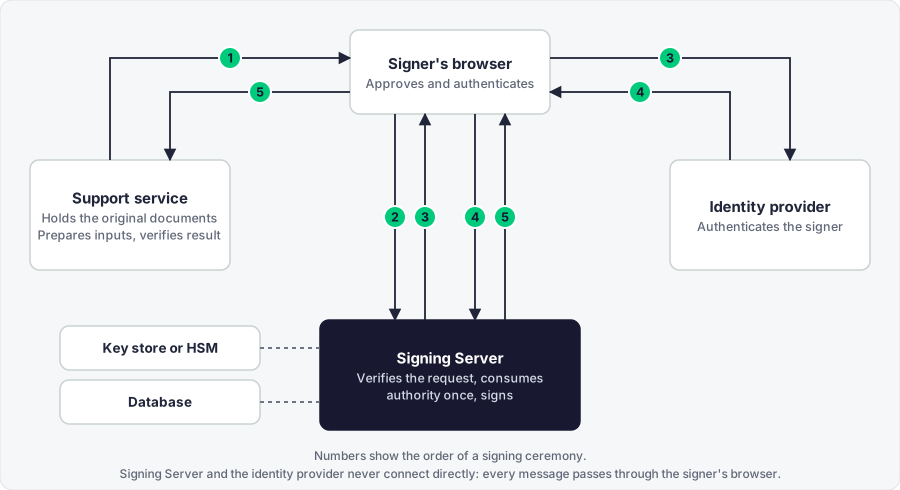
- The support service sends a signed DSS request through the browser.
- Approval is collected according to the configured display policy.
- Signing Server requests fresh SAML authentication from the identity provider.
- The identity provider returns a signed and encrypted SAML response through the browser.
- Signing Server validates identity and authority, signs, and returns a signed DSS response to the support service.
The identity provider may use an upstream SAML or OIDC source. Signing Server's identity-provider boundary is SAML. The CSC flow has its own OAuth endpoints and collects separate consent after identity verification.
Start here
Section titled “Start here”For implemented profiles and verified installation combinations, see Supported platforms and scope.
For configuration, keys and databases, see Installation. Select DSS, CSC, organization seal or time stamping in Integration.
Read Architecture and security model for identity, consent and key boundaries, and Operations for monitoring, event logging and diagnostics.