
Forms
The main building blocks used when Control is operating through Forms.
Forms is typically used for delegated administration, self-service processes, approval workflows, and identity lifecycle management.
Forms can also be presented through an optional Launchpad experience when you want to group several flows behind a shared navigation view.
A Form is built from a small set of reusable components:
- Flows – the complete process executed by the user.
- Steps – individual pages within the Flow.
- Controls – user interface elements shown on a Step.
- Pipes – logic used to retrieve data, save changes, or execute business rules.
Together, these components make it possible to build everything from simple data lookup pages to advanced multi-step administration workflows.
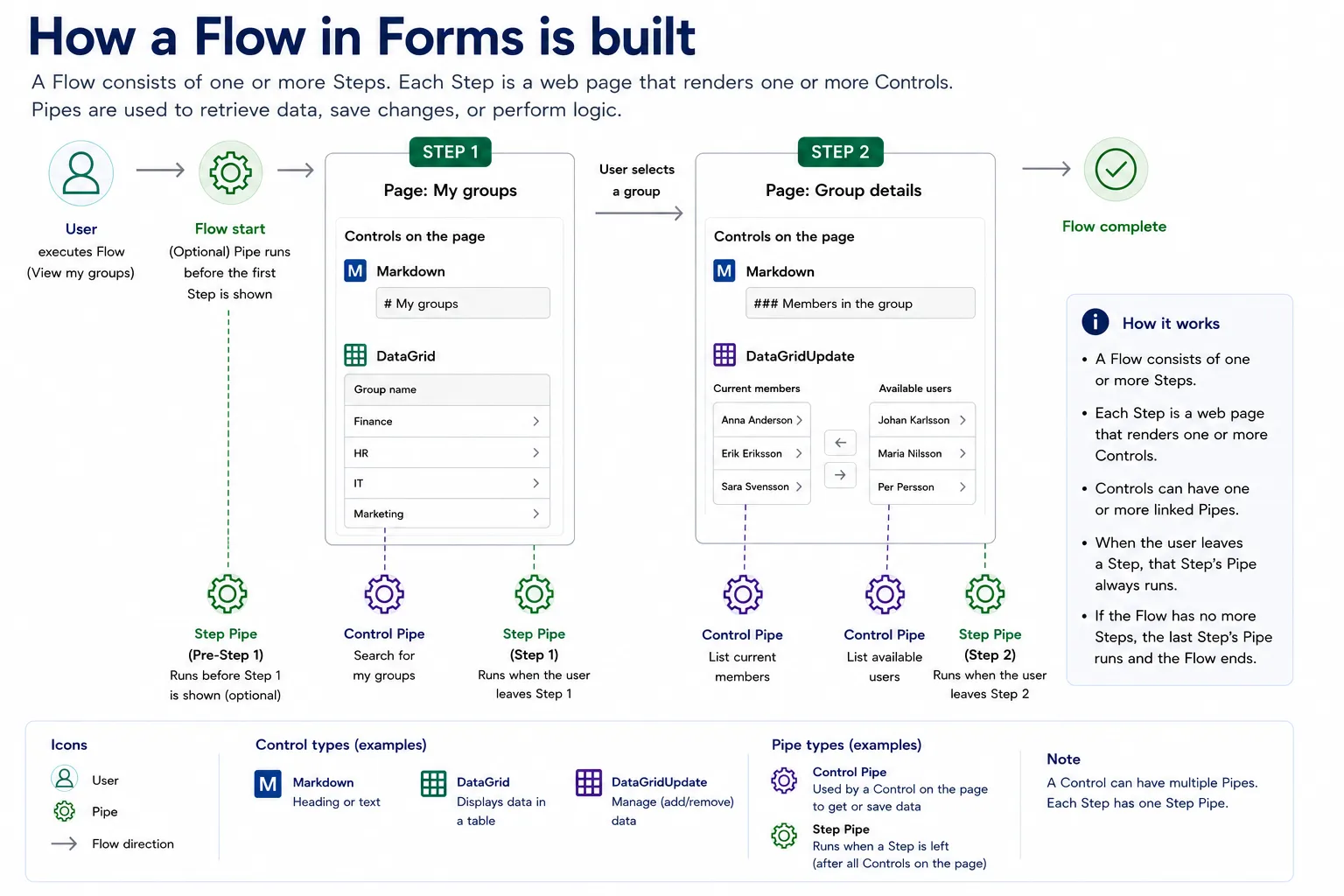
A Flow contains one or more Steps. Each Step contains one or more Controls. Pipes provide the logic that retrieves data, performs validation, and saves changes.
Forms architecture overview
Section titled “Forms architecture overview”The diagram below illustrates how the different components work together in a typical Flow.
In this example:
- A user starts a Flow.
- An optional pre-step Pipe can prepare data before the first page is displayed.
- Step 1 displays a list of groups using Controls on the page.
- When the user selects a group and leaves the Step, the Step Pipe executes.
- Step 2 displays details about the selected group.
- Additional Control Pipes retrieve and update data.
- When the final Step is completed, the Flow ends.
Key concepts
Section titled “Key concepts”A Flow represents the complete user journey.
A Flow contains one or more Steps and defines the overall process from start to finish.
Examples:
- View my groups
- Create a user
- Request access
- Manage group membership
A Step is a single page within a Flow.
Each Step renders one or more Controls and may execute a Step Pipe when the user leaves the page.
Typical examples include:
- Search page
- Details page
- Confirmation page
Control
Section titled “Control”Controls are the building blocks displayed on a Step.
Examples include:
- Markdown
- DataGrid
- DataGridUpdate
- Input controls
- Selection controls
Controls are responsible for presenting information and collecting user input.
Pipes contain the logic behind the Flow.
They are commonly used to:
- Retrieve data
- Validate input
- Save changes
- Execute business logic
- Integrate with external systems
There are two main types of Pipes:
Control Pipe
A Control Pipe is connected to a specific Control.
It is typically used to populate a Control with data or save information entered by the user.
Step Pipe
A Step Pipe belongs to a Step.
It runs when the user leaves the Step and is commonly used to perform validation, persist changes, or prepare data for the next Step.
In this section